即刻安装 Cobo WaaS Skill,在 Claude Code、Cursor 等 AI 开发环境中使用自然语言集成 WaaS API,显著提升开发效率 🚀
在您通过Cobo Portal 快速入门指南熟悉了 MPC 钱包之后,本指南将帮助您使用 WaaS 2.0 API 将 MPC 钱包(机构钱包)功能无缝集成到您的应用程序中,包括:
  1. 创建钱包
  2. 存入和提取代币
  3. 查询钱包余额
本指南在所有代码示例中使用开发环境。建议您首先使用开发环境测试新功能,然后再将其部署到生产环境。

技术架构

在开始之前,了解 MPC 钱包的技术架构会很有帮助,包括 Vault、钱包、地址和私钥分片之间的关系。下图展示了一个完整的 MPC Vault 中的组件: 完整的 MPC Vault 中的组件
  • 钱包始终与某个 Vault 相关联。Vault 是所有拥有相同根扩展公私钥对的机构钱包的集合。
  • 根扩展公钥:根扩展公钥用于分层确定性(HD)钱包中,以派生多个子公钥和地址。每个 Vault 有两个根扩展公钥,一个从 Secp256k1 曲线派生(用于比特币和以太坊等链),另一个从 EdDSA 曲线派生(用于 Solona 和 TON 等链)。要了解更多关于根扩展公钥的信息,请参阅密钥派生
  • 私钥分片持有者:每个 Vault 可以有多种私钥分片持有者,包括主控私钥,签名私钥和恢复私钥。每种私钥分片持有者都包括一组 TSS Node ,存储可以共同签署交易或恢复根扩展私钥的私钥分片。对于主控私钥和签名私钥,始终会有一个私钥分片持有者是 Cobo。要了解更多关于私钥分片持有者组的信息,请参阅创建持有者组概览
  • TSS 私钥分片组:每个 TSS 私钥分片组由两个或三个私钥分片组成,具体取决于持有者的数量。每个私钥分片组可以与从同一条曲线派生的根扩展公钥形成一个密钥对。每个私钥分片都是独一无二的。

前提条件

  • 在调用 WaaS API 创建钱包之前,您必须首先按照Cobo Portal 快速入门指南中的说明设置一个 Vault。
  • 按照发送您的第一个 API 请求中的说明设置您的账户并发送您的第一个 API 请求到 WaaS 2.0 服务。
  • 如果您选择使用 WaaS SDK 而不是手动编写 API 请求,请参阅相应编程语言的 SDK 指南(PythonJavaGoJavaScript),将 SDK 集成到您的项目中。

1. 创建钱包

设置完 Vault,创建私钥分片持有者,并生成私钥分片后,您就可以开始创建钱包了。调用创建钱包操作,并在请求包体中指定以下属性:
  • name:您的钱包名称。
  • wallet_typeMPC
  • wallet_subtypeOrg-Controlled
  • vault_id:您刚刚创建的 Vault ID。
成功完成请求后,响应将包含钱包 ID,即您刚刚创建的钱包的唯一标识符。存储此钱包 ID,因为您将在后续步骤中使用它。
import json
import cobo_waas2
from cobo_waas2.models.create_wallet_params import CreateWalletParams
from cobo_waas2.models.created_wallet_info import CreatedWalletInfo
from cobo_waas2.models.wallet_subtype import WalletSubtype
from cobo_waas2.models.wallet_type import WalletType
from cobo_waas2.rest import ApiException
from pprint import pprint

# Defining the host is optional and defaults to https://api.dev.cobo.com/v2
# See configuration.py for a list of all supported configuration parameters.
configuration = cobo_waas2.Configuration(
    api_private_key="<YOUR_API_SECRET>",
    host="https://api.dev.cobo.com/v2"
)
# Enter a context with an instance of the API client
with cobo_waas2.ApiClient(configuration) as api_client:
    # Create an instance of the API class
    api_instance = cobo_waas2.WalletsApi(api_client)
    create_wallet_params = cobo_waas2.CreateWalletParams(
        actual_instance=cobo_waas2.CreateMpcWalletParams(
            name="<YOUR_WALLET_NAME>",
            wallet_type=WalletType.MPC,
            wallet_subtype=WalletSubtype.ORG_CONTROLLED,
            vault_id="<YOUR_VAULT_ID>"
        )
    )

    try:
        # Create a wallet
        api_response = api_instance.create_wallet(create_wallet_params=create_wallet_params)
        print("The response of WalletsApi->create_wallet:\n")
        print(json.dumps(api_response.to_dict(), indent=2))
    except Exception as e:
        print("Exception when calling WalletsApi->create_wallet: %s\n" % e)
import com.cobo.waas2.ApiClient;
import com.cobo.waas2.ApiException;
import com.cobo.waas2.Configuration;
import com.cobo.waas2.Env;
import com.cobo.waas2.api.WalletsApi;
import com.cobo.waas2.model.*;

public class CreateWalletExample {
    public static void main(String[] args) {
        ApiClient defaultClient = Configuration.getDefaultApiClient();
        // Use the development environment
        defaultClient.setEnv(Env.DEV);
        // Replace `<YOUR_API_SECRET>` with your API secret
        defaultClient.setPrivKey("<YOUR_API_SECRET>");
        WalletsApi apiInstance = new WalletsApi();
        try {
            CreateMpcWalletParams params = new CreateMpcWalletParams()
                    .name("OCW Example Wallet Demo(Java)")
                    .walletType(WalletType.MPC)
                    .walletSubtype(WalletSubtype.ORG_CONTROLLED)
                    .vaultId("<YOUR_VAULT_ID>");
            CreatedWalletInfo result = apiInstance.createWallet(new CreateWalletParams(params));
            System.out.println(result);
        } catch (ApiException e) {
            System.err.println("Exception when calling WalletsApi#createWallet");
            System.err.println("Status code: " + e.getCode());
            System.err.println("Reason: " + e.getResponseBody());
            System.err.println("Response headers: " + e.getResponseHeaders());
            e.printStackTrace();
        }
    }
}

2. 存入和提取代币

设置机构钱包后,您可以存入一些代币并学习如何提取代币。

生成充币地址

要接收代币,您需要在钱包中生成充币地址。要生成充币地址,请调用Create addresses in wallet 并指定以下参数和属性:
  • 路径:
    • wallet_id:您刚刚创建的钱包 ID。
  • 请求包体:
    • chain_id:区块链的 ID。
    • count:使用此参数指定要创建的地址数量。
成功完成请求后,响应将包含您刚刚创建的地址。您现在可以存入代币到这些地址。
import json

import cobo_waas2
from cobo_waas2 import (
   CreateAddressRequest,
   AddressEncoding,
)

configuration = cobo_waas2.Configuration(
   # Replace `<YOUR_API_SECRET>` with your API secret
   api_private_key="<YOUR_API_SECRET>",
   # Use the development environment
   host="https://api.dev.cobo.com/v2"
)

# Enter a context with an instance of the API client
with cobo_waas2.ApiClient(configuration) as api_client:
   # Create an instance of the API class
   wallet_api_instance = cobo_waas2.WalletsApi(api_client)
   try:
       # Generate two addresses on the Bitcoin testnet3 (XTN) chain using P2TR encoding
       api_response = wallet_api_instance.create_address(
           wallet_id="<Your Wallet ID>",
           create_address_request=CreateAddressRequest(
               chain_id="XTN", count=2, encoding=AddressEncoding.ENCODING_P2_TR
           ),
       )
       print("The response of WalletsApi->create_address:")
       for address_info in api_response:
           print(json.dumps(address_info.to_dict(), indent=2))

   except Exception as e:
       print("Exception when calling WalletsApi->create_address, %s\n", e)
import com.cobo.waas2.ApiClient;
import com.cobo.waas2.ApiException;
import com.cobo.waas2.Configuration;
import com.cobo.waas2.Env;
import com.cobo.waas2.api.WalletsApi;
import com.cobo.waas2.model.AddressEncoding;
import com.cobo.waas2.model.AddressInfo;
import com.cobo.waas2.model.CreateAddressRequest;

import java.util.List;
import java.util.UUID;

public class CreateAddressExample {
    public static void main(String[] args) {
        ApiClient defaultClient = Configuration.getDefaultApiClient();
        // Use the development environment
        defaultClient.setEnv(Env.DEV);
        // Replace `<YOUR_API_SECRET>` with your API secret
        defaultClient.setPrivKey("<YOUR_API_SECRET>");
        WalletsApi apiInstance = new WalletsApi();
        try {
            UUID wallet_id = UUID.fromString("<YOUR_WALLET_ID>");
            CreateAddressRequest params = new CreateAddressRequest()
                    .chainId("XTN")
                    .count(2)
                    .encoding(AddressEncoding.BECH32);
            List<AddressInfo> result = apiInstance.createAddress(wallet_id, params);
            for (AddressInfo addressInfo : result)
                System.out.println(addressInfo);
        } catch (ApiException e) {
            System.err.println("Exception when calling WalletsApi#createAddress");
            System.err.println("Status code: " + e.getCode());
            System.err.println("Reason: " + e.getResponseBody());
            System.err.println("Response headers: " + e.getResponseHeaders());
            e.printStackTrace();
        }
    }
}

处理充币

在将代币存入生成的地址后,您可以通过以下两种方式跟踪充币状态。我们推荐使用 Webhook,因为它能提供实时通知,相比定期使用 API 查询交易状态更为高效和实时。

选项 1:使用 Webhook 进行实时通知

Webhook 是 WaaS 服务与您的 App 通信的重要机制。注册 Webhook Endpoint 后,WaaS 服务会在事件发生时将推送消息发送到指定的 URL。 要了解如何设置 Webhook Endpoint 并在 Cobo Portal 上注册,请参阅 Webhook 和 Callback 简介 要跟踪充币状态,您可以订阅以下 Webhook 事件类型:
  • wallets.transaction.created
  • wallets.transaction.updated
  • wallets.transaction.succeeded
  • wallets.transaction.failed
要了解每个事件类型的触发条件和数据结构,请参阅 Webhook 事件类型和数据类型

选项 2:通过 API 调用获取交易状态

要查询充币交易的状态,请调用 List all transactions,并设置以下查询参数:
  • typesDeposit
  • statusesConfirming,Completed。如果您从外部地址充币,则可以在交易等待所需的确认数量或成功完成时查询交易详细信息。
  • wallet_ids:您在第一步中创建的钱包 ID。
import json
import uuid


import cobo_waas2
from cobo_waas2 import (
   CreateAddressRequest,
   AddressEncoding,
   TransferParams,
   TransferSource,
   MpcTransferSource,
   WalletSubtype,
   TransferDestination, AddressTransferDestination, TransferDestinationType, AddressTransferDestinationAccountOutput,
)


configuration = cobo_waas2.Configuration(
   # Replace `<YOUR_API_SECRET>` with your API secret.
   api_private_key="<YOUR_API_SECRET>",
   # Use the development environment.
   host="https://api.dev.cobo.com/v2"
)


# Enter a context with an instance of the API client
with cobo_waas2.ApiClient(configuration) as api_client:
   # Create an instance of the API class
   transaction_api_instance = cobo_waas2.TransactionsApi(api_client)
   try:
       # List deposit transactions
       api_response = transaction_api_instance.list_transactions(
           types="Deposit",
           statuses="Confirming, Completed",
           wallet_ids="<YOUR_WALLET_ID>"
       )
       print("The response of TransactionsApi->list_transactions:")
       print(json.dumps(api_response.to_dict(), indent=2))


   except Exception as e:
       print("Exception when calling TransactionsApi->list_transactions, %s\n", e)
import com.cobo.waas2.ApiClient;
import com.cobo.waas2.ApiException;
import com.cobo.waas2.Configuration;
import com.cobo.waas2.Env;
import com.cobo.waas2.api.TransactionsApi;
import com.cobo.waas2.model.ListTransactions200Response;


import java.util.UUID;


public class ListTransactionsExample {
   public static void main(String[] args) {
       ApiClient defaultClient = Configuration.getDefaultApiClient();
       // Use the development environment
       defaultClient.setEnv(Env.DEV);
       // Replace `<YOUR_API_SECRET>` with your API secret
       defaultClient.setPrivKey("<YOUR_API_SECRET>");
       TransactionsApi apiInstance = new TransactionsApi();
       try {
           String requestId = null;
           String coboIds = null;
           String transactionIds = null;
           String transactionHashes = "";
           String types = "Deposit";
           String statuses = "Confirming, Completed";
           String walletIds = "<YOUR_WALLET_ID>";
           String chainIds = null;
           String tokenIds = null;
           String assetIds = null;
           UUID vaultId = null;
           UUID projectId = null;
           Long minCreatedTimestamp = null;
           Long maxCreatedTimestamp = null;
           Integer limit = 50;
           String before = null;
           String after = null;


           ListTransactions200Response result = apiInstance.listTransactions(
                   requestId, coboIds, transactionIds, transactionHashes, types, statuses, walletIds, chainIds,
                   tokenIds, assetIds, vaultId, projectId, minCreatedTimestamp, maxCreatedTimestamp, limit, before, after);
           System.out.println(result);
       } catch (ApiException e) {
           System.err.println("Exception when calling WalletsApi#createAddress");
           System.err.println("Status code: " + e.getCode());
           System.err.println("Reason: " + e.getResponseBody());
           System.err.println("Response headers: " + e.getResponseHeaders());
           e.printStackTrace();
       }
   }
}

提取代币

现在您的钱包中已经有代币了,让我们来了解提现流程。在进行第一次提现之前,您需要了解两个重要事项:
  1. 提现流程:提现涉及多个步骤,包括发起、二次确认、风险控制检查和交易签名。要详细了解每个步骤,请参阅从 MPC 钱包(机构控制钱包)转账
  2. Callback Endpoint 设置:为了增强安全性,您应该设置一个 Callback Endpoint 来二次确认提现请求。当您通过 WaaS 2.0 API 发起提现时,该 Endpoint 将接收交易详情,并且必须确认这些详情后才能继续进行交易。要进行设置,请参考我们的 Webhook 和 Callback 指南。

发起提现

了解这些概念后,您可以通过调用 Transfer token 操作来发起提现。在请求包体中设置以下属性:
  • request_id:您的请求 ID。
  • source.source_typeOrg-Controlled
  • source.wallet_id:您刚刚创建的钱包 ID。
  • token_id:您要提取的代币 ID。
  • destination.destination_typeAddress
  • destination.account_output:接收地址和 memo(如有),以及您要提取的金额。
  • category_names:用于识别交易的自定义类别。
  • description:转账的描述。
import json
import uuid

import cobo_waas2
from cobo_waas2 import (
   CreateAddressRequest,
   AddressEncoding,
   TransferParams,
   TransferSource,
   MpcTransferSource,
   WalletSubtype,
   TransferDestination, AddressTransferDestination, TransferDestinationType, AddressTransferDestinationAccountOutput,
)

configuration = cobo_waas2.Configuration(
   # Replace `<YOUR_API_SECRET>` with your API secret
   api_private_key="<YOUR_API_SECRET>",
   # Use the development environment
   host="https://api.dev.cobo.com/v2"
)

# Enter a context with an instance of the API client
with cobo_waas2.ApiClient(configuration) as api_client:
   # Create an instance of the API class
   transaction_api_instance = cobo_waas2.TransactionsApi(api_client)
   try:
       # Withdraw Bitcoin testnet3(XTN) tokens from the wallet
       api_response = transaction_api_instance.create_transfer_transaction(
           transfer_params=TransferParams(
               request_id=str(uuid.uuid4()),
               source=TransferSource(
                   actual_instance=MpcTransferSource
                   (
                       source_type=WalletSubtype.ORG_CONTROLLED,
                       wallet_id="<YOUR_WALLET ID>",
                   )
               ),
               token_id="XTN",
               destination=TransferDestination(
                   actual_instance=AddressTransferDestination(
                       destination_type=TransferDestinationType.ADDRESS,
                       account_output=AddressTransferDestinationAccountOutput(
                           address="<TARGET_ADDRESS>",
                           amount="<TRANSFER_AMOUNT>"
                       )
                   )
               ),
               category_names=["<CATEGORY_NAME>"],
               description="<DESCRIPTION>",
           )
       )
       print("The response of TransactionsApi->create_transfer_transaction:")
       print(json.dumps(api_response.to_dict(), indent=2))

   except Exception as e:
       print("Exception when calling TransactionsApi->create_transfer_transaction, %s\n", e)
import com.cobo.waas2.ApiClient;
import com.cobo.waas2.ApiException;
import com.cobo.waas2.Configuration;
import com.cobo.waas2.Env;
import com.cobo.waas2.api.TransactionsApi;
import com.cobo.waas2.model.*;

import java.util.ArrayList;
import java.util.List;
import java.util.UUID;

public class TransferExample {
    public static void main(String[] args) {
        ApiClient defaultClient = Configuration.getDefaultApiClient();
        // Use the development environment
        defaultClient.setEnv(Env.DEV);
        // Replace `<YOUR_API_SECRET>` with your API secret
        defaultClient.setPrivKey("<YOUR_API_SECRET>");
        TransactionsApi apiInstance = new TransactionsApi();
        try {
            UUID walletId = UUID.fromString("<YOUR_WALLET_ID>");

            TransferParams params = new TransferParams();
            params.setRequestId("Demo" + UUID.randomUUID());

            MpcTransferSource transferSource = new MpcTransferSource().sourceType(WalletSubtype.ORG_CONTROLLED).walletId(walletId);
            params.setSource(new TransferSource(transferSource));

            params.setTokenId("XTN");
            AddressTransferDestination addressTransferDestination = new AddressTransferDestination()
                    .destinationType(TransferDestinationType.ADDRESS)
                    .accountOutput(new AddressTransferDestinationAccountOutput()
                            .address("<TARGET_ADDRESS>")
                            .amount("<TRANSFER_AMOUNT>"));
            params.setDestination(new TransferDestination(addressTransferDestination));

            List<String> categoryNames = new ArrayList<>();
            categoryNames.add("<Category Example>");
            params.categoryNames(categoryNames).description("<Description Example>");

            CreateTransferTransaction201Response result = apiInstance.createTransferTransaction(params);
            System.out.println(result);
        } catch (ApiException e) {
            System.err.println("Exception when calling TransactionsApi#createTransferTransaction");
            System.err.println("Status code: " + e.getCode());
            System.err.println("Reason: " + e.getResponseBody());
            System.err.println("Response headers: " + e.getResponseHeaders());
            e.printStackTrace();
        }
    }
}
提币请求的响应如下。记录交易 ID,因为您将在后续步骤中使用它。
{
   "request_id": "<YOUR_REQUEST_ID>",
   "transaction_id": "<THE_GENERATED_TRANSACTION_ID>",
   "status": "Submitted"
}

确认提币

如果您设置了 Callback Endpoint,在发起提币交易后,您的 Callback Endpoint 将接收包含交易详细信息的消息。检查交易是否符合预期,然后响应成功状态码(200 或 201)和响应包体 ok 以批准交易。要了解更多关于处理 Callback 消息的信息,请参阅实现处理逻辑

签署交易

确认提币后,系统将根据您的签名模式和签名人类型将交易发送给对应的签名人。交易将保持 Pending 状态,直到收到必要的签名。
  • 对于移动端签名人,您需要通知他们打开 Cobo Guard 应用并签署交易。
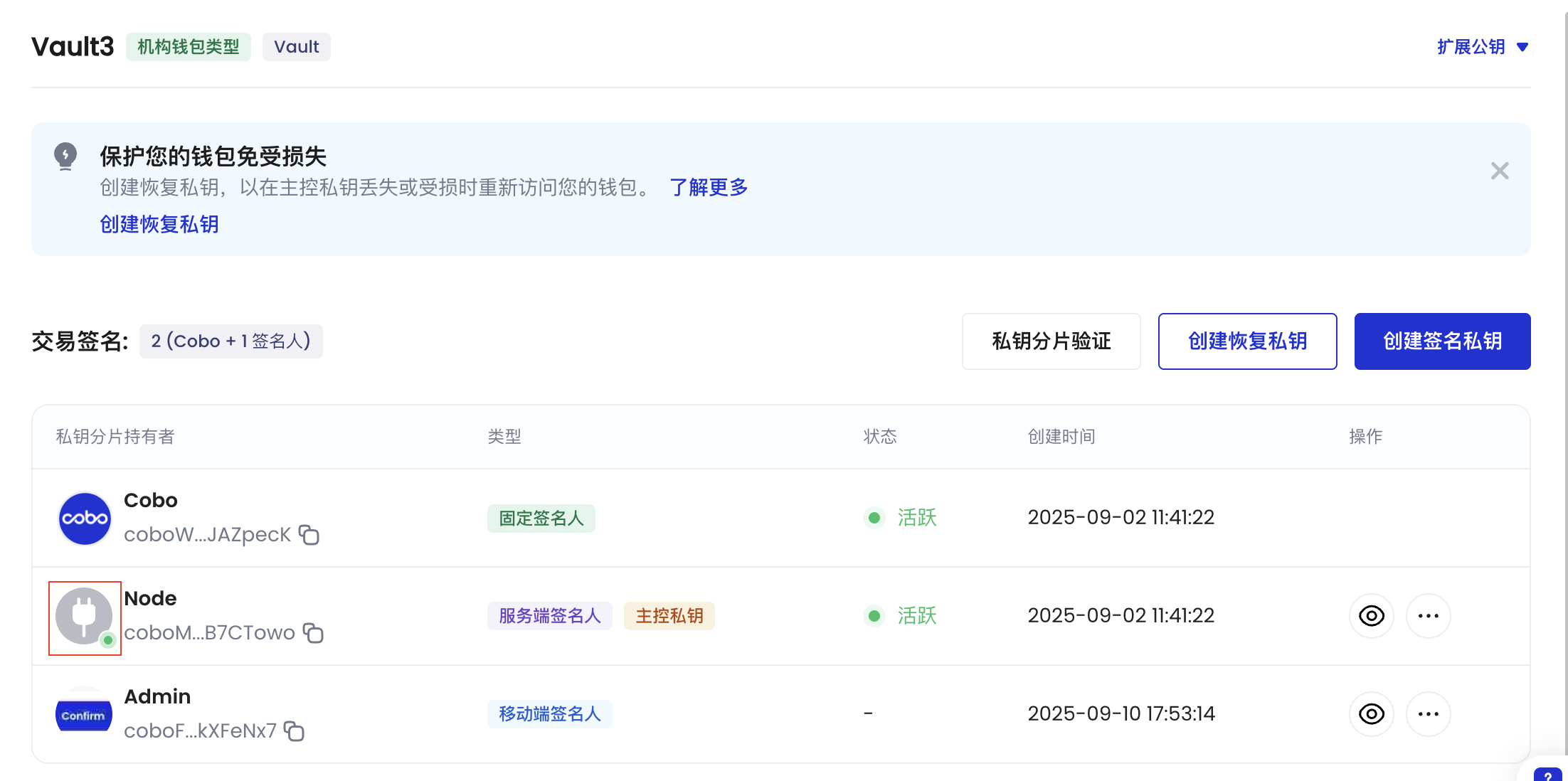
  • 对于服务端签名人,您可以通过 Cobo Portal 查看签名人是否在线:
    1. 登录 Cobo Portal
    2. 点击 > MPC 钱包
    3. 选择您的 Vault,然后点击右上角的 图标。
    4. 私钥分片管理页面,找到您的服务端签名人,并查看旁边的状态指示:
      • 🟢 绿点:签名人在线并准备签署交易
      • 无绿点:签名人离线,无法签署交易。
      密钥份额管理页面显示签名人状态

监控提币状态

除了 Webhook 事件外,您还可以调用 Get transaction information 来查询交易状态。将路径参数 transaction_id 设置为上一步提币请求响应中的交易 ID。
import json
import uuid


import cobo_waas2
from cobo_waas2 import (
   CreateAddressRequest,
   AddressEncoding,
   TransferParams,
   TransferSource,
   MpcTransferSource,
   WalletSubtype,
   TransferDestination, AddressTransferDestination, TransferDestinationType, AddressTransferDestinationAccountOutput,
)


configuration = cobo_waas2.Configuration(
   # Replace `<YOUR_API_SECRET>` with your API secret.
   api_private_key="<YOUR_API_SECRET>",
   # Use the development environment.
   host="https://api.dev.cobo.com/v2"
)


# Enter a context with an instance of the API client
with cobo_waas2.ApiClient(configuration) as api_client:
   # Create an instance of the API class
   transaction_api_instance = cobo_waas2.TransactionsApi(api_client)
   try:
       # Get transaction by ID
       api_response = transaction_api_instance.get_transaction_by_id(
           transaction_id="<YOUR_TRANSACTION_ID>"
       )
       print("The response of TransactionsApi->get_transaction_by_id:")
       print(json.dumps(api_response.to_dict(), indent=2))


   except Exception as e:
       print("Exception when calling TransactionsApi->get_transaction_by_id, %s\n", e)
import com.cobo.waas2.ApiClient;
import com.cobo.waas2.ApiException;
import com.cobo.waas2.Configuration;
import com.cobo.waas2.Env;
import com.cobo.waas2.api.TransactionsApi;
import com.cobo.waas2.model.TransactionDetail;


import java.util.UUID;


public class GetTransactionExample {
   public static void main(String[] args) {
       ApiClient defaultClient = Configuration.getDefaultApiClient();
       // Use the development environment
       defaultClient.setEnv(Env.DEV);
       // Replace `<YOUR_API_SECRET>` with your API secret
       defaultClient.setPrivKey("<YOUR_API_SECRET>");
       TransactionsApi apiInstance = new TransactionsApi();
       try {
           UUID transactionId = UUID.fromString("<YOUR_TRANSACTION_ID>");


           TransactionDetail result = apiInstance.getTransactionById(transactionId);
           System.out.println(result);
       } catch (ApiException e) {
           System.err.println("Exception when calling TransactionsApi#getTransactionById");
           System.err.println("Status code: " + e.getCode());
           System.err.println("Reason: " + e.getResponseBody());
           System.err.println("Response headers: " + e.getResponseHeaders());
           e.printStackTrace();
       }
   }
}

3. 查询钱包余额

成功提取代币后,您可以调用 List token balances by wallet 来查询钱包余额。指定以下路径和查询参数:
  • wallet_id:您刚刚创建的钱包 ID。
  • token_ids:您可以留空此参数来查询所有代币的余额,或者设置为您要查询的特定代币。
import json


import cobo_waas2
from cobo_waas2 import (
   WalletType,
   WalletSubtype,
)


configuration = cobo_waas2.Configuration(
   # Replace `<YOUR_API_SECRET>` with your API secret.
   api_private_key="<YOUR_API_SECRET>",
   # Use the development environment.
   host="https://api.dev.cobo.com/v2"
)


# Enter a context with an instance of the API client
with cobo_waas2.ApiClient(configuration) as api_client:
   # Create an instance of the API class
   wallet_api_instance = cobo_waas2.WalletsApi(api_client)
   try:
       # List token balances
       api_response = wallet_api_instance.list_token_balances_for_wallet(
           wallet_id="<YOUR_WALLET_ID>",
       )
       print(f"The response of WalletsApi->list_token_balances_for_wallet:")
       print(json.dumps(api_response.to_dict(), indent=2))


   except Exception as e:
       print("Exception when calling WalletsApi->list_token_balances_for_wallet, %s\n", e)
import com.cobo.waas2.ApiClient;
import com.cobo.waas2.ApiException;
import com.cobo.waas2.Configuration;
import com.cobo.waas2.Env;
import com.cobo.waas2.api.WalletsApi;
import com.cobo.waas2.model.ListTokenBalancesForAddress200Response;

import java.util.UUID;

public class ListTokenBalancesExample {
    public static void main(String[] args) {
        ApiClient defaultClient = Configuration.getDefaultApiClient();
        // Use the development environment
        defaultClient.setEnv(Env.DEV);
        // Replace `<YOUR_API_SECRET>` with your API secret
        defaultClient.setPrivKey("<YOUR_API_SECRET>");
        WalletsApi apiInstance = new WalletsApi();
        try {
            UUID wallet_id = UUID.fromString("<YOUR_WALLET_ID>");
            String tokenIds = null;
            Integer limit = 50;
            String before = null;
            String after = null;
            ListTokenBalancesForAddress200Response result = apiInstance.listTokenBalancesForWallet(wallet_id, tokenIds, limit, before, after);
            System.out.println(result);
        } catch (ApiException e) {
            System.err.println("Exception when calling WalletsApi#listTokenBalancesForWallet");
            System.err.println("Status code: " + e.getCode());
            System.err.println("Reason: " + e.getResponseBody());
            System.err.println("Response headers: " + e.getResponseHeaders());
            e.printStackTrace();
        }
    }
}