> ## Documentation Index
> Fetch the complete documentation index at: https://cobo.com/developers/llms.txt
> Use this file to discover all available pages before exploring further.
# Integrate Smart Contract Wallets (Safe{Wallet})
> Introduction to setting up and using Smart Contract Wallets in WaaS 2.0 for secure and automated transactions.
Try [Cobo WaaS Skill](/v2/guides/overview/cobo-waas-skill) in your AI coding assistant (Claude Code, Cursor, etc.). Describe your needs in natural language to auto-generate production-ready SDK code and debug faster 🚀
This guide gets you started with using [Smart Contract Wallets (Safe\{Wallet})](https://manuals.cobo.com/en/portal/smart-contract-wallets/introduction). By following this guide, you will be able to use the WaaS 2.0 API to:
1. Query the chains and tokens you can use
2. Set up a Safe\{Wallet} and configure transaction policies
3. Deposit and withdraw tokens
4. Call a smart contract
This guide uses the [development environment](/v2/guides/overview/environments) in all its code samples. It is recommended that you use the development environment to test your new features first before deploying them to the production environment.
## Prerequisites
Before setting up a Safe\{Wallet}, you must perform the following steps:
* You have created an [MPC Wallet (Organization-Controlled Wallet)](https://manuals.cobo.com/en/portal/mpc-wallets/introduction) either on [Cobo Portal](https://manuals.cobo.com/en/portal/mpc-wallets/ocw/set-up) or via the [WaaS API](/v2/guides/mpc-wallets/get-started-ocw), and generated a wallet address. This wallet address will serve as the Delegate for your Safe\{Wallet}.
* You have been assigned the [Operator](https://manuals.cobo.com/en/portal/organization/roles-and-permissions) role or a custom role with equivalent permissions.
For using the WaaS API, ensure the following:
* Follow the instructions in [Send your first request](/v2/guides/get-started/get-started-with-waas) to set up your account and send your first API request to the WaaS 2.0 service.
* If you choose to use a WaaS SDK instead of manually writing the API requests, refer to the SDK guide corresponding to the programming language of your choice ([Python](/v2/developer-tools/quickstart-python), [Java](/v2/developer-tools/quickstart-java), [Go](/v2/developer-tools/quickstart-go), [JavaScript](/v2/developer-tools/quickstart-javascript) to integrate the SDK into your project.
* Prepare some test tokens as you will need them when testing the deposit feature. To know which test tokens you can use, refer to [Query chain and token information](#1-query-enabled-chains). In most cases, you can use XTN as the test token.
* It is highly recommended that you set up a callback endpoint to receive and approve withdrawal requests and a webhook endpoint to receive real-time notifications regarding transaction status updates and other events of your concern. To learn how to set up and register webhook and callback endpoints, refer to [Introduction to webhooks and callbacks](/v2/guides/webhooks-callbacks/introduction).
## 1. Query enabled chains
Before you begin setting up your wallet and generating deposit addresses, it's important to know which chains and tokens you can use. To retrieve the chains you can use for Safe\{Wallet} and their corresponding chain IDs, call [List enabled chains](/v2/api-references/wallets/list-enabled-chains) and specify the query parameters as follows:
* `wallet_type`: `SmartContract`.
* `wallet_subtype`: `Safe{Wallet}`.
```py theme={null}
import json
import cobo_waas2
from cobo_waas2 import (
WalletType,
WalletSubtype,
)
configuration = cobo_waas2.Configuration(
# Replace `` with your API secret
api_private_key="",
# Use the development environment
host="https://api.dev.cobo.com/v2"
)
# Enter a context with an instance of the API client
with cobo_waas2.ApiClient(configuration) as api_client:
# Create an instance of the API class
wallet_api_instance = cobo_waas2.WalletsApi(api_client)
try:
# Query enabled chains
api_response = wallet_api_instance.list_enabled_chains(
wallet_type=WalletType.SMARTCONTRACT,
wallet_subtype=WalletSubtype.SAFE_WALLET
)
print(f"The response of WalletsApi->list_enabled_chains:")
print(json.dumps(api_response.to_dict(), indent=2))
except Exception as e:
print("Exception when calling WalletsApi->list_enabled_chains, %s\n", e)
```
If you want to use a chain that is not already on the list, you need to enable the chain first on Cobo Portal. To learn how to do so, see [Transfer (deposit / withdraw)](https://manuals.cobo.com/en/portal/mpc-wallets/ocw/transfers).
If you have reached the limit on the number of chains you can use, consider upgrading your [pricing plan](https://manuals.cobo.com/en/portal/bills-and-payments/introduction).
## 2. Query enabled tokens
To retrieve the tokens you can use for Safe\{Wallet} and their corresponding token IDs, call [List enabled tokens](/v2/api-references/wallets/list-enabled-tokens) and specify the query parameters as follows:
* `wallet_type`: `SmartContract`.
* `wallet_subtype`: `Safe{Wallet}`.
* `chain_ids`: Specify the chain of your choice. You can also leave this parameter empty to query enabled tokens on all chains.
```py theme={null}
import json
import cobo_waas2
from cobo_waas2 import (
WalletType,
WalletSubtype,
)
configuration = cobo_waas2.Configuration(
# Replace `` with your API secret
api_private_key="",
# Use the development environment
host="https://api.dev.cobo.com/v2"
)
# Enter a context with an instance of the API client
with cobo_waas2.ApiClient(configuration) as api_client:
# Create an instance of the API class
wallet_api_instance = cobo_waas2.WalletsApi(api_client)
try:
# Query enabled tokens
api_response = wallet_api_instance.list_enabled_tokens(
wallet_type=WalletType.SMARTCONTRACT,
wallet_subtype=WalletSubtype.SAFE_WALLET
)
print(f"The response of WalletsApi->list_enabled_tokens:")
print(json.dumps(api_response.to_dict(), indent=2))
except Exception as e:
print("Exception when calling WalletsApi->list_enabled_tokens, %s\n", e)
```
## 3. Set up a wallet
Set up a Safe\{Wallet} on Cobo Portal by following the steps below:
1. If you already have a Safe\{Wallet}, you can [import it into Cobo Portal](https://manuals.cobo.com/en/portal/smart-contract-wallets/import). You can also [create a Safe\{Wallet} directly on Cobo Portal](https://manuals.cobo.com/en/portal/smart-contract-wallets/create).
2. [Set up a Delegate Key](https://manuals.cobo.com/en/portal/smart-contract-wallets/set-up-delegate-keys) for your Safe\{Wallet}.
## 4. Configure on-chain transaction policies
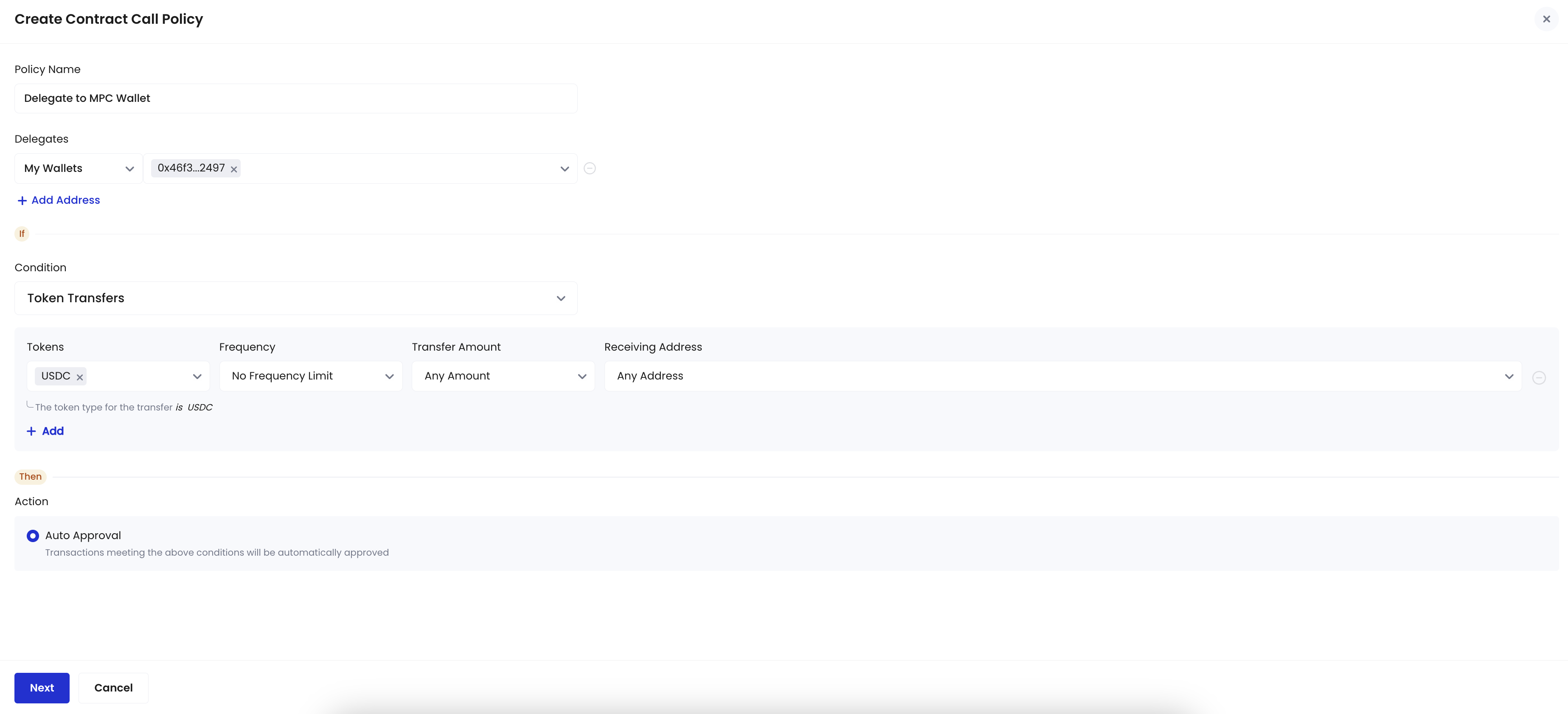
To allow Delegates to perform single-signature operations, you must [set up on-chain transaction policies](https://manuals.cobo.com/en/portal/risk-controls/create-on-chain-policy) on Cobo Portal to automatically approve certain transactions initiated by the Delegates. In this guide, we will use the MPC Wallet address you have prepared in the [Prerequisites](#prerequisites) section as the Delegate.
1. Configure policies to automatically approve token withdrawals and contract calls initiated via the MPC Wallet. Refer to the provided screenshot as an example.
 2. A multi-sig confirmation from Safe{Wallet} signers is required. Click **Submit** to initiate the multi-sig transaction.
## 5. Deposit tokens
Follow the instructions in [Deposit assets](https://manuals.cobo.com/en/portal/smart-contract-wallets/deposit-assets) to deposit tokens into your Safe\{Wallet}.
After depositing tokens to the addresses you have generated, you can track the status of your deposit using one of the following two options. Compared with using API to query the transaction status, webhooks can give you real-time notifications and are thus the recommended option.
#### **Option 1: Use webhooks for real-time notifications**
Webhook is an essential mechanism for the WaaS service to communicate with your application. After you register a webhook endpoint on Cobo Portal, the WaaS service sends push messages to the designated URL when an event occurs.
To learn how to set up a webhook endpoint and register it on Cobo Portal, refer to [Introduction to webhooks and callbacks](/v2/guides/webhooks-callbacks/introduction).
To track the status of your deposit, you can subscribe to the following webhook event types:
* wallets.transaction.created
* wallets.transaction.updated
* wallets.transaction.succeeded
* wallets.transaction.failed
To learn the trigger condition and data structure of each event type, refer to [Webhook event types and data types](/v2/guides/webhooks-callbacks/webhook-event-type).
#### **Option 2: Get transaction status by API call**
To query the status of a deposit transaction, call the [List all transactions](/v2/api-references/transactions/list-all-transactions) operation and set the query parameters as follows:
* `types`: `Deposit`.
* `statuses`: `Confirming, Completed`. If you are depositing from an external address, you will be able to query the transaction details when the transaction is waiting for the required number of confirmations or when it is successfully executed.
* `wallet_ids`: The ID of the wallet you have created in the first step. You can get the wallet ID from the wallet list on Cobo Portal.
```py theme={null}
import json
import uuid
import cobo_waas2
from cobo_waas2 import (
CreateAddressRequest,
AddressEncoding,
TransferParams,
TransferSource,
MpcTransferSource,
WalletSubtype,
TransferDestination, AddressTransferDestination, TransferDestinationType, AddressTransferDestinationAccountOutput,
)
configuration = cobo_waas2.Configuration(
# Replace `` with your API secret.
api_private_key="",
# Use the development environment.
host="https://api.dev.cobo.com/v2"
)
# Enter a context with an instance of the API client
with cobo_waas2.ApiClient(configuration) as api_client:
# Create an instance of the API class
transaction_api_instance = cobo_waas2.TransactionsApi(api_client)
try:
# List deposit transactions
api_response = transaction_api_instance.list_transactions(
types="Deposit",
statuses="Confirming, Completed",
wallet_ids=""
)
print("The response of TransactionsApi->list_transactions:")
print(json.dumps(api_response.to_dict(), indent=2))
except Exception as e:
print("Exception when calling TransactionsApi->list_transactions, %s\n", e)
```
## 6. Withdrawal tokens
Now that you have tokens in your wallet, it’s time to try withdrawing them.
#### Set up a callback endpoint
To enhance the security of your transactions, it is highly recommended that you set up a callback endpoint to receive and approve withdrawal requests. Once you initiate a withdrawal using the WaaS 2.0 API, the callback endpoint will receive a callback message containing the transaction details. The transaction will proceed only if you approve the withdrawal request.
To learn how to set up a callback endpoint and register it on Cobo Portal, refer to [Introduction to webhooks and callbacks](/v2/guides/webhooks-callbacks/introduction).
#### **Withdraw tokens**
1. To withdraw tokens from your Safe\{Wallet}, you should first get its wallet ID from Cobo Portal. Hover over the wallet in the wallet list, copy the wallet ID, and save it for future reference.
2. Call [List Delegates](/v2/api-references/wallets--smart-contract-wallets/list-delegates) to retrieve the available Delegates. Specify the parameters and properties as follows:
* Path:
* `wallet_id`: The wallet ID of your Safe\{Wallet}.
* Request body:
* `request_type`: `Transfer`
3. Call [Transfer token](/v2/api-references/transactions/transfer-token) to initiate the withdrawal with the Delegate. Specify the properties in the request body as follows:
* `request_id`: Use a unique ID to track the transaction request.
* `source`:
* `source_type`: `Safe{Wallet}`
* `wallet_id`: The wallet ID of your Safe\{Wallet}.
* `address`: The address of your Safe\{Wallet}. You can call the [Get wallet information](/v2/api-references/wallets/get-wallet-information) operation to retrieve the address.
* `delegate`: The information of the Delegate. You can call the [List Delegates](/v2/api-references/wallets--smart-contract-wallets/list-delegates) operation to retrieve the applicable Delegates.
* `token_id`: The token ID.
* `destination`:
* `destination_type`: `Address`
* `account_output`
* `address`: The receiving address.
* `memo`: The memo, if applicable.
* `amount`: The transfer amount.
* `category_names`: The custom category for you to identify your transactions.
* `description`: The description of the transfer.
```py theme={null}
import json
import uuid
import cobo_waas2
configuration = cobo_waas2.Configuration(
# Replace `` with your API secret
api_private_key="",
# Use the development environment
host="https://api.dev.cobo.com/v2"
)
def get_delegate(wallet_id, request: cobo_waas2.SafeWalletDelegates):
# Enter a context with an instance of the API client
with cobo_waas2.ApiClient(configuration) as api_client:
# Create an instance of the API class
wallet_api_instance = cobo_waas2.WalletsSmartContractWalletsApi(api_client)
try:
# Call the List Delegates operation to retrieve available Delegates
api_response = wallet_api_instance.list_safe_wallet_delegates(
wallet_id=wallet_id,
safe_wallet_delegates=request
)
if not api_response:
raise Exception("No delegate found")
print("The response of WalletsApi->list_safe_wallet_delegates:")
print(json.dumps(api_response[0].to_dict(), indent=2))
# Return the first Delegate
return api_response[0]
except Exception as e:
print("Exception when calling WalletsApi: %s\n", e)
def get_wallet(wallet_id) -> cobo_waas2.SafeWallet:
with cobo_waas2.ApiClient(configuration) as api_client:
# Create an instance of the API class
wallet_api_instance = cobo_waas2.WalletsApi(api_client)
try:
# Call the Get wallet information operation to retrieve the wallet information, including the wallet address
api_response = wallet_api_instance.get_wallet_by_id(
wallet_id=wallet_id
)
print("The response of WalletsApi->get_wallet_by_id:")
print(json.dumps(api_response.to_dict(), indent=2))
return api_response.actual_instance.actual_instance
except Exception as e:
print("Exception when calling WalletsApi: %s\n", e)
token_id = ""
# Enther the receiving address
receiver_address = ""
# Enter the wallet ID found on Cobo Portal
wallet_id = ""
# Enter the amount of tokens you want to transfer
amount = ""
transfer_request = cobo_waas2.SafeWalletDelegates(
actual_instance=cobo_waas2.SafeWalletDelegatesTransfer(
request_type=cobo_waas2.EstimateFeeRequestType.TRANSFER,
token_id=token_id,
address=receiver_address,
)
)
# Retrieve a list of available Delegates
delegate = get_delegate(wallet_id, transfer_request)
# Retrieve detailed information about the Safe{Wallet}
wallet = get_wallet(wallet_id)
with cobo_waas2.ApiClient(configuration) as api_client:
# Create an instance of the API class
wallet_api_instance = cobo_waas2.TransactionsApi(api_client)
try:
# Initiate token transfer through a Delegate
api_response = wallet_api_instance.create_transfer_transaction(
cobo_waas2.TransferParams(
request_id=str(uuid.uuid4()),
# Set the sending address and the Delegate
source=cobo_waas2.TransferSource(
actual_instance=cobo_waas2.SafeTransferSource(
source_type=cobo_waas2.WalletSubtype.SAFE_WALLET,
wallet_id=wallet_id,
address=wallet.safe_address,
delegate=delegate,
)
),
token_id=token_id,
# Set the receiving address and withdrawal amount
destination=cobo_waas2.TransferDestination(
actual_instance=cobo_waas2.AddressTransferDestination(
destination_type=cobo_waas2.TransferDestinationType.ADDRESS,
account_output=cobo_waas2.AddressTransferDestinationAccountOutput(
address=receiver_address,
amount=amount,
),
),
),
category_names=[""],
description="",
)
)
print("The response of TransactionsApi->create_transfer_transaction:")
print(json.dumps(api_response.to_dict(), indent=2))
except Exception as e:
print("Exception when calling WalletsApi: %s\n", e)
```
The response of the withdrawal request is as follows. Record the transaction ID as you will use it in the following steps.
```
{
"request_id": "",
"transaction_id": "",
"status": "Submitted"
}
```
#### Confirm the withdrawal
If you have set up a callback endpoint, after you initiate the withdrawal transaction, your callback endpoint will receive a message containing the transaction details. Check if the transaction meets expectations, and respond with a success status code (200 or 201) and a response body of `ok` to approve the transaction. To learn more about handling a callback message, see Handle messages.
#### Monitor the withdrawal status
In addition to webhook events, you can also call the [Get transaction information](/v2/api-references/transactions/get-transaction-information) operation to query the status of the transaction. Set the path parameter `transaction_id` to the transaction ID returned in the response of the previous withdrawal request.
```py theme={null}
import json
import uuid
import cobo_waas2
from cobo_waas2 import (
CreateAddressRequest,
AddressEncoding,
TransferParams,
TransferSource,
MpcTransferSource,
WalletSubtype,
TransferDestination, AddressTransferDestination, TransferDestinationType, AddressTransferDestinationAccountOutput,
)
configuration = cobo_waas2.Configuration(
# Replace `` with your API secret.
api_private_key="",
# Use the development environment.
host="https://api.dev.cobo.com/v2"
)
# Enter a context with an instance of the API client
with cobo_waas2.ApiClient(configuration) as api_client:
# Create an instance of the API class
transaction_api_instance = cobo_waas2.TransactionsApi(api_client)
try:
# Get transaction by ID
api_response = transaction_api_instance.get_transaction_by_id(
transaction_id=""
)
print("The response of TransactionsApi->get_transaction_by_id:")
print(json.dumps(api_response.to_dict(), indent=2))
except Exception as e:
print("Exception when calling TransactionsApi->get_transaction_by_id, %s\n", e)
```
## 7. Call a smart contract
This section introduces how to call a smart contract using your Safe\{Wallet} through the Delegate.
1. Get the wallet ID of your Safe\{Wallet} from Cobo Portal. Hover over the wallet in the wallet list, copy the wallet ID, and save it for future reference.
2. Call [List Delegates](/v2/api-references/wallets--smart-contract-wallets/list-delegates) to retrieve the available Delegates. Specify the parameters and properties as follows:
* Path:
* `wallet_id`: The wallet ID of your Safe\{Wallet}.
* Request body:
* `request_type`: `ContractCall`
3. Use the [Call smart contract](/v2/api-references/transactions/call-smart-contract) operation to call the smart contract with the Delegate. Specify the properties in the request body as follows:
* `request_id`: Use a unique ID to track the transaction request.
* `chain_id`: The ID of the chain on which your Safe\{Wallet} operates. You can call the [Get wallet information](/v2/api-references/wallets/get-wallet-information) operation to retrieve the information.
* `source`:
* `source_type`: `Safe{Wallet}`
* `wallet_id`: The wallet ID of your Safe\{Wallet}.
* `address`: The address of your Safe\{Wallet}. You can call the [Get wallet information](/v2/api-references/wallets/get-wallet-information) operation to retrieve the information.
* `delegate`: The information of the Delegate. You can call the [List Delegates](/v2/api-references/wallets--smart-contract-wallets/list-delegates) operation to retrieve the applicable Delegates.
* `destination`:
* `destination_type`: `EVM_Contract`
* `address`: The destination address.
* `value` : The transfer amount.
* `calldata`: The transaction calldata.
* `category_names`: The custom category for you to identify your transactions.
* `description`: The description of the transfer.
```py theme={null}
import json
import cobo_waas2
configuration = cobo_waas2.Configuration(
# Replace `` with your API secret
api_private_key="",
# Use the development environment
host="https://api.dev.cobo.com/v2"
)
def get_delegate(wallet_id, request: cobo_waas2.SafeWalletDelegates):
# Enter a context with an instance of the API client
with cobo_waas2.ApiClient(configuration) as api_client:
# Create an instance of the API class
wallet_api_instance = cobo_waas2.WalletsSmartContractWalletsApi(api_client)
try:
# Call the List Delegates operation to retrieve available Delegates
api_response = wallet_api_instance.list_safe_wallet_delegates(
wallet_id=wallet_id,
safe_wallet_delegates=request
)
if not api_response:
raise Exception("No delegate found")
print("The response of WalletsApi->list_safe_wallet_delegates:")
print(json.dumps(api_response[0].to_dict(), indent=2))
return api_response[0]
except Exception as e:
print("Exception when calling WalletsApi: %s\n", e)
def get_wallet(wallet_id) -> cobo_waas2.SafeWallet:
with cobo_waas2.ApiClient(configuration) as api_client:
# Create an instance of the API class
wallet_api_instance = cobo_waas2.WalletsApi(api_client)
try:
# Call the Get wallet information operation to retrieve the wallet information, including the wallet address
api_response = wallet_api_instance.get_wallet_by_id(
wallet_id=wallet_id
)
print("The response of WalletsApi->get_wallet_by_id:")
print(json.dumps(api_response.to_dict(), indent=2))
return api_response.actual_instance.actual_instance
except Exception as e:
print("Exception when calling WalletsApi: %s\n", e)
# Set the destination address
contract_address = ""
# Set the transaction calldata
data = ""
# Set the transfer amount
value = ""
contract_call_request = cobo_waas2.SafeWalletDelegates(
actual_instance=cobo_waas2.SafeWalletDelegatesContractCall(
request_type=cobo_waas2.EstimateFeeRequestType.CONTRACTCALL,
address=contract_address,
calldata=data,
value=value,
)
)
# Retrieve a list of available Delegates.
delegate = get_delegate(wallet_id, contract_call_request)
# Retrieve detailed information about the Safe{Wallet}.
wallet = get_wallet(wallet_id)
with cobo_waas2.ApiClient(configuration) as api_client:
wallet_api_instance = cobo_waas2.TransactionsApi(api_client)
try:
# Call the smart contract
api_response = wallet_api_instance.create_contract_call_transaction(
cobo_waas2.ContractCallParams(
request_id=str(uuid.uuid4()),
chain_id=wallet.chain_id,
source=cobo_waas2.ContractCallSource(
actual_instance=cobo_waas2.SafeContractCallSource(
source_type=cobo_waas2.ContractCallSourceType.SAFE_WALLET,
wallet_id=wallet_id,
address=wallet.safe_address,
delegate=delegate,
)
),
destination=cobo_waas2.ContractCallDestination(
actual_instance=cobo_waas2.EvmContractCallDestination(
destination_type=cobo_waas2.ContractCallDestinationType.EVM_CONTRACT,
address=contract_address,
calldata=data,
value=value,
),
),
category_names=[""],
description="",
)
)
print("The response of TransactionsApi->create_contract_call_transaction:")
print(json.dumps(api_response.to_dict(), indent=2))
except Exception as e:
print("Exception when calling TransactionsApi: %s\n", e)
```
The response of the contract call request is as follows. You can use the transaction ID from the response to query the transaction status by calling the [Get transaction information](/v2/api-references/transactions/get-transaction-information) operation.
```
{
"request_id": "",
"transaction_id": "",
"status": "Submitted"
}
```
2. A multi-sig confirmation from Safe{Wallet} signers is required. Click **Submit** to initiate the multi-sig transaction.
## 5. Deposit tokens
Follow the instructions in [Deposit assets](https://manuals.cobo.com/en/portal/smart-contract-wallets/deposit-assets) to deposit tokens into your Safe\{Wallet}.
After depositing tokens to the addresses you have generated, you can track the status of your deposit using one of the following two options. Compared with using API to query the transaction status, webhooks can give you real-time notifications and are thus the recommended option.
#### **Option 1: Use webhooks for real-time notifications**
Webhook is an essential mechanism for the WaaS service to communicate with your application. After you register a webhook endpoint on Cobo Portal, the WaaS service sends push messages to the designated URL when an event occurs.
To learn how to set up a webhook endpoint and register it on Cobo Portal, refer to [Introduction to webhooks and callbacks](/v2/guides/webhooks-callbacks/introduction).
To track the status of your deposit, you can subscribe to the following webhook event types:
* wallets.transaction.created
* wallets.transaction.updated
* wallets.transaction.succeeded
* wallets.transaction.failed
To learn the trigger condition and data structure of each event type, refer to [Webhook event types and data types](/v2/guides/webhooks-callbacks/webhook-event-type).
#### **Option 2: Get transaction status by API call**
To query the status of a deposit transaction, call the [List all transactions](/v2/api-references/transactions/list-all-transactions) operation and set the query parameters as follows:
* `types`: `Deposit`.
* `statuses`: `Confirming, Completed`. If you are depositing from an external address, you will be able to query the transaction details when the transaction is waiting for the required number of confirmations or when it is successfully executed.
* `wallet_ids`: The ID of the wallet you have created in the first step. You can get the wallet ID from the wallet list on Cobo Portal.
```py theme={null}
import json
import uuid
import cobo_waas2
from cobo_waas2 import (
CreateAddressRequest,
AddressEncoding,
TransferParams,
TransferSource,
MpcTransferSource,
WalletSubtype,
TransferDestination, AddressTransferDestination, TransferDestinationType, AddressTransferDestinationAccountOutput,
)
configuration = cobo_waas2.Configuration(
# Replace `` with your API secret.
api_private_key="",
# Use the development environment.
host="https://api.dev.cobo.com/v2"
)
# Enter a context with an instance of the API client
with cobo_waas2.ApiClient(configuration) as api_client:
# Create an instance of the API class
transaction_api_instance = cobo_waas2.TransactionsApi(api_client)
try:
# List deposit transactions
api_response = transaction_api_instance.list_transactions(
types="Deposit",
statuses="Confirming, Completed",
wallet_ids=""
)
print("The response of TransactionsApi->list_transactions:")
print(json.dumps(api_response.to_dict(), indent=2))
except Exception as e:
print("Exception when calling TransactionsApi->list_transactions, %s\n", e)
```
## 6. Withdrawal tokens
Now that you have tokens in your wallet, it’s time to try withdrawing them.
#### Set up a callback endpoint
To enhance the security of your transactions, it is highly recommended that you set up a callback endpoint to receive and approve withdrawal requests. Once you initiate a withdrawal using the WaaS 2.0 API, the callback endpoint will receive a callback message containing the transaction details. The transaction will proceed only if you approve the withdrawal request.
To learn how to set up a callback endpoint and register it on Cobo Portal, refer to [Introduction to webhooks and callbacks](/v2/guides/webhooks-callbacks/introduction).
#### **Withdraw tokens**
1. To withdraw tokens from your Safe\{Wallet}, you should first get its wallet ID from Cobo Portal. Hover over the wallet in the wallet list, copy the wallet ID, and save it for future reference.
2. Call [List Delegates](/v2/api-references/wallets--smart-contract-wallets/list-delegates) to retrieve the available Delegates. Specify the parameters and properties as follows:
* Path:
* `wallet_id`: The wallet ID of your Safe\{Wallet}.
* Request body:
* `request_type`: `Transfer`
3. Call [Transfer token](/v2/api-references/transactions/transfer-token) to initiate the withdrawal with the Delegate. Specify the properties in the request body as follows:
* `request_id`: Use a unique ID to track the transaction request.
* `source`:
* `source_type`: `Safe{Wallet}`
* `wallet_id`: The wallet ID of your Safe\{Wallet}.
* `address`: The address of your Safe\{Wallet}. You can call the [Get wallet information](/v2/api-references/wallets/get-wallet-information) operation to retrieve the address.
* `delegate`: The information of the Delegate. You can call the [List Delegates](/v2/api-references/wallets--smart-contract-wallets/list-delegates) operation to retrieve the applicable Delegates.
* `token_id`: The token ID.
* `destination`:
* `destination_type`: `Address`
* `account_output`
* `address`: The receiving address.
* `memo`: The memo, if applicable.
* `amount`: The transfer amount.
* `category_names`: The custom category for you to identify your transactions.
* `description`: The description of the transfer.
```py theme={null}
import json
import uuid
import cobo_waas2
configuration = cobo_waas2.Configuration(
# Replace `` with your API secret
api_private_key="",
# Use the development environment
host="https://api.dev.cobo.com/v2"
)
def get_delegate(wallet_id, request: cobo_waas2.SafeWalletDelegates):
# Enter a context with an instance of the API client
with cobo_waas2.ApiClient(configuration) as api_client:
# Create an instance of the API class
wallet_api_instance = cobo_waas2.WalletsSmartContractWalletsApi(api_client)
try:
# Call the List Delegates operation to retrieve available Delegates
api_response = wallet_api_instance.list_safe_wallet_delegates(
wallet_id=wallet_id,
safe_wallet_delegates=request
)
if not api_response:
raise Exception("No delegate found")
print("The response of WalletsApi->list_safe_wallet_delegates:")
print(json.dumps(api_response[0].to_dict(), indent=2))
# Return the first Delegate
return api_response[0]
except Exception as e:
print("Exception when calling WalletsApi: %s\n", e)
def get_wallet(wallet_id) -> cobo_waas2.SafeWallet:
with cobo_waas2.ApiClient(configuration) as api_client:
# Create an instance of the API class
wallet_api_instance = cobo_waas2.WalletsApi(api_client)
try:
# Call the Get wallet information operation to retrieve the wallet information, including the wallet address
api_response = wallet_api_instance.get_wallet_by_id(
wallet_id=wallet_id
)
print("The response of WalletsApi->get_wallet_by_id:")
print(json.dumps(api_response.to_dict(), indent=2))
return api_response.actual_instance.actual_instance
except Exception as e:
print("Exception when calling WalletsApi: %s\n", e)
token_id = ""
# Enther the receiving address
receiver_address = ""
# Enter the wallet ID found on Cobo Portal
wallet_id = ""
# Enter the amount of tokens you want to transfer
amount = ""
transfer_request = cobo_waas2.SafeWalletDelegates(
actual_instance=cobo_waas2.SafeWalletDelegatesTransfer(
request_type=cobo_waas2.EstimateFeeRequestType.TRANSFER,
token_id=token_id,
address=receiver_address,
)
)
# Retrieve a list of available Delegates
delegate = get_delegate(wallet_id, transfer_request)
# Retrieve detailed information about the Safe{Wallet}
wallet = get_wallet(wallet_id)
with cobo_waas2.ApiClient(configuration) as api_client:
# Create an instance of the API class
wallet_api_instance = cobo_waas2.TransactionsApi(api_client)
try:
# Initiate token transfer through a Delegate
api_response = wallet_api_instance.create_transfer_transaction(
cobo_waas2.TransferParams(
request_id=str(uuid.uuid4()),
# Set the sending address and the Delegate
source=cobo_waas2.TransferSource(
actual_instance=cobo_waas2.SafeTransferSource(
source_type=cobo_waas2.WalletSubtype.SAFE_WALLET,
wallet_id=wallet_id,
address=wallet.safe_address,
delegate=delegate,
)
),
token_id=token_id,
# Set the receiving address and withdrawal amount
destination=cobo_waas2.TransferDestination(
actual_instance=cobo_waas2.AddressTransferDestination(
destination_type=cobo_waas2.TransferDestinationType.ADDRESS,
account_output=cobo_waas2.AddressTransferDestinationAccountOutput(
address=receiver_address,
amount=amount,
),
),
),
category_names=[""],
description="",
)
)
print("The response of TransactionsApi->create_transfer_transaction:")
print(json.dumps(api_response.to_dict(), indent=2))
except Exception as e:
print("Exception when calling WalletsApi: %s\n", e)
```
The response of the withdrawal request is as follows. Record the transaction ID as you will use it in the following steps.
```
{
"request_id": "",
"transaction_id": "",
"status": "Submitted"
}
```
#### Confirm the withdrawal
If you have set up a callback endpoint, after you initiate the withdrawal transaction, your callback endpoint will receive a message containing the transaction details. Check if the transaction meets expectations, and respond with a success status code (200 or 201) and a response body of `ok` to approve the transaction. To learn more about handling a callback message, see Handle messages.
#### Monitor the withdrawal status
In addition to webhook events, you can also call the [Get transaction information](/v2/api-references/transactions/get-transaction-information) operation to query the status of the transaction. Set the path parameter `transaction_id` to the transaction ID returned in the response of the previous withdrawal request.
```py theme={null}
import json
import uuid
import cobo_waas2
from cobo_waas2 import (
CreateAddressRequest,
AddressEncoding,
TransferParams,
TransferSource,
MpcTransferSource,
WalletSubtype,
TransferDestination, AddressTransferDestination, TransferDestinationType, AddressTransferDestinationAccountOutput,
)
configuration = cobo_waas2.Configuration(
# Replace `` with your API secret.
api_private_key="",
# Use the development environment.
host="https://api.dev.cobo.com/v2"
)
# Enter a context with an instance of the API client
with cobo_waas2.ApiClient(configuration) as api_client:
# Create an instance of the API class
transaction_api_instance = cobo_waas2.TransactionsApi(api_client)
try:
# Get transaction by ID
api_response = transaction_api_instance.get_transaction_by_id(
transaction_id=""
)
print("The response of TransactionsApi->get_transaction_by_id:")
print(json.dumps(api_response.to_dict(), indent=2))
except Exception as e:
print("Exception when calling TransactionsApi->get_transaction_by_id, %s\n", e)
```
## 7. Call a smart contract
This section introduces how to call a smart contract using your Safe\{Wallet} through the Delegate.
1. Get the wallet ID of your Safe\{Wallet} from Cobo Portal. Hover over the wallet in the wallet list, copy the wallet ID, and save it for future reference.
2. Call [List Delegates](/v2/api-references/wallets--smart-contract-wallets/list-delegates) to retrieve the available Delegates. Specify the parameters and properties as follows:
* Path:
* `wallet_id`: The wallet ID of your Safe\{Wallet}.
* Request body:
* `request_type`: `ContractCall`
3. Use the [Call smart contract](/v2/api-references/transactions/call-smart-contract) operation to call the smart contract with the Delegate. Specify the properties in the request body as follows:
* `request_id`: Use a unique ID to track the transaction request.
* `chain_id`: The ID of the chain on which your Safe\{Wallet} operates. You can call the [Get wallet information](/v2/api-references/wallets/get-wallet-information) operation to retrieve the information.
* `source`:
* `source_type`: `Safe{Wallet}`
* `wallet_id`: The wallet ID of your Safe\{Wallet}.
* `address`: The address of your Safe\{Wallet}. You can call the [Get wallet information](/v2/api-references/wallets/get-wallet-information) operation to retrieve the information.
* `delegate`: The information of the Delegate. You can call the [List Delegates](/v2/api-references/wallets--smart-contract-wallets/list-delegates) operation to retrieve the applicable Delegates.
* `destination`:
* `destination_type`: `EVM_Contract`
* `address`: The destination address.
* `value` : The transfer amount.
* `calldata`: The transaction calldata.
* `category_names`: The custom category for you to identify your transactions.
* `description`: The description of the transfer.
```py theme={null}
import json
import cobo_waas2
configuration = cobo_waas2.Configuration(
# Replace `` with your API secret
api_private_key="",
# Use the development environment
host="https://api.dev.cobo.com/v2"
)
def get_delegate(wallet_id, request: cobo_waas2.SafeWalletDelegates):
# Enter a context with an instance of the API client
with cobo_waas2.ApiClient(configuration) as api_client:
# Create an instance of the API class
wallet_api_instance = cobo_waas2.WalletsSmartContractWalletsApi(api_client)
try:
# Call the List Delegates operation to retrieve available Delegates
api_response = wallet_api_instance.list_safe_wallet_delegates(
wallet_id=wallet_id,
safe_wallet_delegates=request
)
if not api_response:
raise Exception("No delegate found")
print("The response of WalletsApi->list_safe_wallet_delegates:")
print(json.dumps(api_response[0].to_dict(), indent=2))
return api_response[0]
except Exception as e:
print("Exception when calling WalletsApi: %s\n", e)
def get_wallet(wallet_id) -> cobo_waas2.SafeWallet:
with cobo_waas2.ApiClient(configuration) as api_client:
# Create an instance of the API class
wallet_api_instance = cobo_waas2.WalletsApi(api_client)
try:
# Call the Get wallet information operation to retrieve the wallet information, including the wallet address
api_response = wallet_api_instance.get_wallet_by_id(
wallet_id=wallet_id
)
print("The response of WalletsApi->get_wallet_by_id:")
print(json.dumps(api_response.to_dict(), indent=2))
return api_response.actual_instance.actual_instance
except Exception as e:
print("Exception when calling WalletsApi: %s\n", e)
# Set the destination address
contract_address = ""
# Set the transaction calldata
data = ""
# Set the transfer amount
value = ""
contract_call_request = cobo_waas2.SafeWalletDelegates(
actual_instance=cobo_waas2.SafeWalletDelegatesContractCall(
request_type=cobo_waas2.EstimateFeeRequestType.CONTRACTCALL,
address=contract_address,
calldata=data,
value=value,
)
)
# Retrieve a list of available Delegates.
delegate = get_delegate(wallet_id, contract_call_request)
# Retrieve detailed information about the Safe{Wallet}.
wallet = get_wallet(wallet_id)
with cobo_waas2.ApiClient(configuration) as api_client:
wallet_api_instance = cobo_waas2.TransactionsApi(api_client)
try:
# Call the smart contract
api_response = wallet_api_instance.create_contract_call_transaction(
cobo_waas2.ContractCallParams(
request_id=str(uuid.uuid4()),
chain_id=wallet.chain_id,
source=cobo_waas2.ContractCallSource(
actual_instance=cobo_waas2.SafeContractCallSource(
source_type=cobo_waas2.ContractCallSourceType.SAFE_WALLET,
wallet_id=wallet_id,
address=wallet.safe_address,
delegate=delegate,
)
),
destination=cobo_waas2.ContractCallDestination(
actual_instance=cobo_waas2.EvmContractCallDestination(
destination_type=cobo_waas2.ContractCallDestinationType.EVM_CONTRACT,
address=contract_address,
calldata=data,
value=value,
),
),
category_names=[""],
description="",
)
)
print("The response of TransactionsApi->create_contract_call_transaction:")
print(json.dumps(api_response.to_dict(), indent=2))
except Exception as e:
print("Exception when calling TransactionsApi: %s\n", e)
```
The response of the contract call request is as follows. You can use the transaction ID from the response to query the transaction status by calling the [Get transaction information](/v2/api-references/transactions/get-transaction-information) operation.
```
{
"request_id": "",
"transaction_id": "",
"status": "Submitted"
}
```