> ## Documentation Index
> Fetch the complete documentation index at: https://cobo.com/developers/llms.txt
> Use this file to discover all available pages before exploring further.
# Back up your key share
> Learn how to back up your key share.
Try [Cobo WaaS Skill](/v2/guides/overview/cobo-waas-skill) in your AI coding assistant (Claude Code, Cursor, etc.). Describe your needs in natural language to auto-generate production-ready SDK code and debug faster 🚀
This article introduces how to back up your key share once you have successfully generated it.
## Prerequisites
* Before proceeding with the backup, please ensure that you have completed the TSS Node initialization by following the steps in [Deploy a TSS Node](/v2/guides/mpc-wallets/server-co-signer/tss-node-deployment).
* You must have [created a key share holder group through Cobo Portal](https://manuals.cobo.com/en/portal/mpc-wallets/ocw/holder-group-overview).
## Verify the root extended public key
You must first check the local key share information before backup and ensure that the root extended public key displayed in Cobo Portal matches the one shown in the TSS Node log.
1. Navigate to the corresponding vault page and click on the **Key Share Management** icon.
 2. You can see the root extended public keys in the **Key Share Management** page.
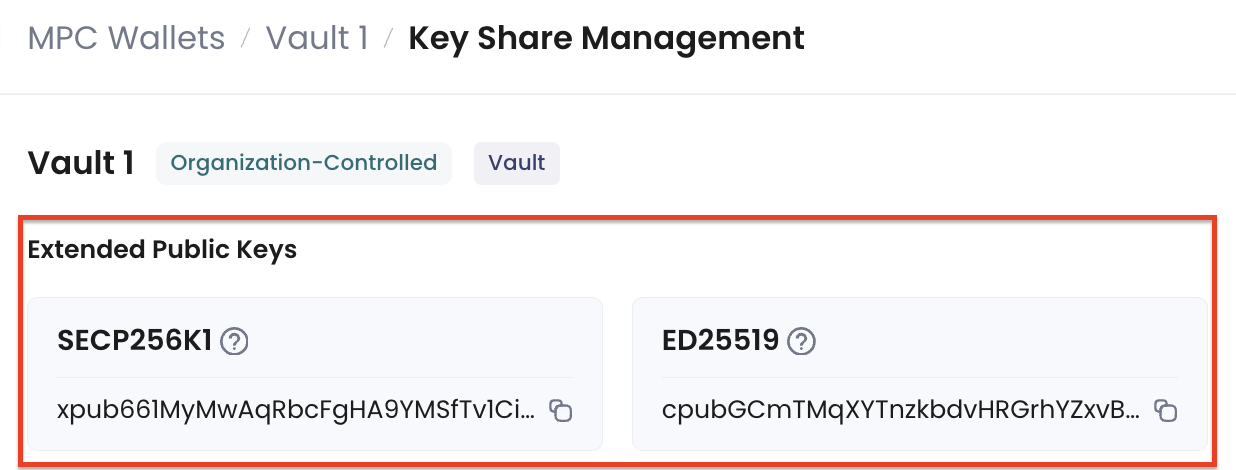 3. Execute the following command to check the root extended public keys in the TSS Node log:
```
sudo ./tss-node.sh info group
```
Example:
```
$ sudo ./tss-node.sh info group
Container started: bc5e54bc4675a46b3edc9bbabc76ebb7d3918260fe8aeb09bbd60375ae26438c
Wait a few seconds ..................
INFO[2022-12-14T09:51:28+08:00] Total number of groups: 2, from db/secrets.db
INFO[2023-01-16T09:04:12+08:00] Group info:
Group ID: OoQGkknsPdPjLCmSuuSf
Created Time: 2023-01-09 17:42:21.391854 +0800 HKT
Root Extended Public Key: xpub661MyMwAqRbcGNFddDqGveSvN9jr1n1GMGFypyhqn34oKyMw9bvrych636CDwgBbLjdLgQRoQtmqPucPb1pZQVBZq3tuXXTQX8wP3JMWAak
ChainCode: 0xb74087d551e44ef8d3a1270accb1977fd373c29fe6e235bc681c59a2137e1334
Share ID: 914259450665435839517029445012417071559
Share Public Key: 0x023633989378b01c2e66d5fd70666101546a310aaab2c08c7b5813be371d438c0d
Type: 1
Curve: secp256k1
Threshold: 2
Local Node ID: cobo2Jitd83uNFZmGnvs8c4Bs1TUNjVVeBQmc82a4KpLFqdbLs
Other Node IDs: [coboBP97RpWKD2WGKhUUtZ1iu6uyWL7MjY4S8MpTUHDiwvRni cobok1nJ4P8DL1mU5SDEzh8QDA5FzdSg7gdkAZKUWK4NuviS4]
Participants: 3
(1) Node ID: coboBP97RpWKD2WGKhUUtZ1iu6uyWL7MjY4S8MpTUHDiwvRni
Share ID: 751341643106997665517612415491881522730
Share Public Key: 0x02ad8728dce88aa210645cff8dea474114376796d81e4b4df76bfa3ea847131b57
(2) Node ID: cobo2Jitd83uNFZmGnvs8c4Bs1TUNjVVeBQmc82a4KpLFqdbLs
Share ID: 914259450665435839517029445012417071559
Share Public Key: 0x023633989378b01c2e66d5fd70666101546a310aaab2c08c7b5813be371d438c0d
(3) Node ID: cobok1nJ4P8DL1mU5SDEzh8QDA5FzdSg7gdkAZKUWK4NuviS4
Share ID: 997493310528521058725882883276549657588
Share Public Key: 0x02a233d2d37297bcfc3092ea65997a29b72931b5ca343db5cd608c85a306be5994
```
Verify that the root extended public key shown in the above log matches the one displayed in Cobo Portal. Otherwise, the backup data will be invalid.
## Back up your key share
After verification, please back up the following data:
1. The encrypted database file located at `db/secrets.db`.
2. The database encryption password, which is the password you set during the TSS Node initialization process.
Both items are critical components of your key share. Losing either one will result in the complete loss of access to your private key. It is crucial to back up both items securely, but they must NOT be stored together, as this would be equivalent to keeping a key with its lock, which compromises security.
3. Execute the following command to check the root extended public keys in the TSS Node log:
```
sudo ./tss-node.sh info group
```
Example:
```
$ sudo ./tss-node.sh info group
Container started: bc5e54bc4675a46b3edc9bbabc76ebb7d3918260fe8aeb09bbd60375ae26438c
Wait a few seconds ..................
INFO[2022-12-14T09:51:28+08:00] Total number of groups: 2, from db/secrets.db
INFO[2023-01-16T09:04:12+08:00] Group info:
Group ID: OoQGkknsPdPjLCmSuuSf
Created Time: 2023-01-09 17:42:21.391854 +0800 HKT
Root Extended Public Key: xpub661MyMwAqRbcGNFddDqGveSvN9jr1n1GMGFypyhqn34oKyMw9bvrych636CDwgBbLjdLgQRoQtmqPucPb1pZQVBZq3tuXXTQX8wP3JMWAak
ChainCode: 0xb74087d551e44ef8d3a1270accb1977fd373c29fe6e235bc681c59a2137e1334
Share ID: 914259450665435839517029445012417071559
Share Public Key: 0x023633989378b01c2e66d5fd70666101546a310aaab2c08c7b5813be371d438c0d
Type: 1
Curve: secp256k1
Threshold: 2
Local Node ID: cobo2Jitd83uNFZmGnvs8c4Bs1TUNjVVeBQmc82a4KpLFqdbLs
Other Node IDs: [coboBP97RpWKD2WGKhUUtZ1iu6uyWL7MjY4S8MpTUHDiwvRni cobok1nJ4P8DL1mU5SDEzh8QDA5FzdSg7gdkAZKUWK4NuviS4]
Participants: 3
(1) Node ID: coboBP97RpWKD2WGKhUUtZ1iu6uyWL7MjY4S8MpTUHDiwvRni
Share ID: 751341643106997665517612415491881522730
Share Public Key: 0x02ad8728dce88aa210645cff8dea474114376796d81e4b4df76bfa3ea847131b57
(2) Node ID: cobo2Jitd83uNFZmGnvs8c4Bs1TUNjVVeBQmc82a4KpLFqdbLs
Share ID: 914259450665435839517029445012417071559
Share Public Key: 0x023633989378b01c2e66d5fd70666101546a310aaab2c08c7b5813be371d438c0d
(3) Node ID: cobok1nJ4P8DL1mU5SDEzh8QDA5FzdSg7gdkAZKUWK4NuviS4
Share ID: 997493310528521058725882883276549657588
Share Public Key: 0x02a233d2d37297bcfc3092ea65997a29b72931b5ca343db5cd608c85a306be5994
```
Verify that the root extended public key shown in the above log matches the one displayed in Cobo Portal. Otherwise, the backup data will be invalid.
## Back up your key share
After verification, please back up the following data:
1. The encrypted database file located at `db/secrets.db`.
2. The database encryption password, which is the password you set during the TSS Node initialization process.
Both items are critical components of your key share. Losing either one will result in the complete loss of access to your private key. It is crucial to back up both items securely, but they must NOT be stored together, as this would be equivalent to keeping a key with its lock, which compromises security.